
The 500 Mbps Illusion: Why Your Raw Internet Speed is Lying to Your Ping

Is 500 Mbps Good for Gaming? Overview:
- Yes, for downloading modern assets: A 500 Mbps connection acts as a massive time-saver, letting you download 100GB+ cinematic story-based games or massive patches in roughly 25 to 30 minutes.
- No, for actual gameplay: Pushing inputs from your mouse and keyboard to a game server requires incredibly lightweight data transfers typically under 5 Mbps to 10 Mbps.
- Latency beats bandwidth: A stable 50 Mbps fiber connection with zero packet loss will consistently provide a better competitive experience than a jittery 500 Mbps cable connection prone to traffic jams.
The Reality Behind the Marketing
Ask an ISP if 500 Mbps is good for gaming, and they will give you a standard commodity sales pitch: "It’s incredible! You can stream in 4K, host a Zoom call, and dominate your lobbies all at the same time."
But if you are pushing a high-end rig like pairing an NVIDIA GeForce RTX 5090 with a Ryzen 9800X3D to squeeze out every possible frame where milliseconds dictate survival, that 500 Mbps number is practically irrelevant. Online gaming doesn’t need a massive data highway; it needs a hyper-efficient one.
To evaluate whether 500 Mbps is truly “good” for your setup, we have to look past the marketing and break down how that bandwidth performs under actual real-world stress.
1. The Latency Fallacy: Bandwidth vs. Delivery Speed
Think of your internet connection like a shipping lane. Bandwidth (500 Mbps) is the width of the canal how many cargo ships can fit side-by-side. Latency (Ping) is how fast a single speedboat can zip from your system to the game server and back.
- [Commodity Metric]: 500 Mbps Capacity (The size of the pipe).
- [Real-World Metric]: 15ms Ping / 0% Packet Loss (The speed and integrity of the data).
You can have a massive 500 Mbps connection, but if your data is traveling over an outdated coaxial cable network during peak neighborhood hours, your packets will get stuck in traffic. A clean, stable 50 Mbps fiber-optic line with a direct routing path to a game server will consistently outperform a congested 500 Mbps cable or 5G home internet connection in competitive match play.
2. The Invisible Killer: “Bufferbloat” under Household Load
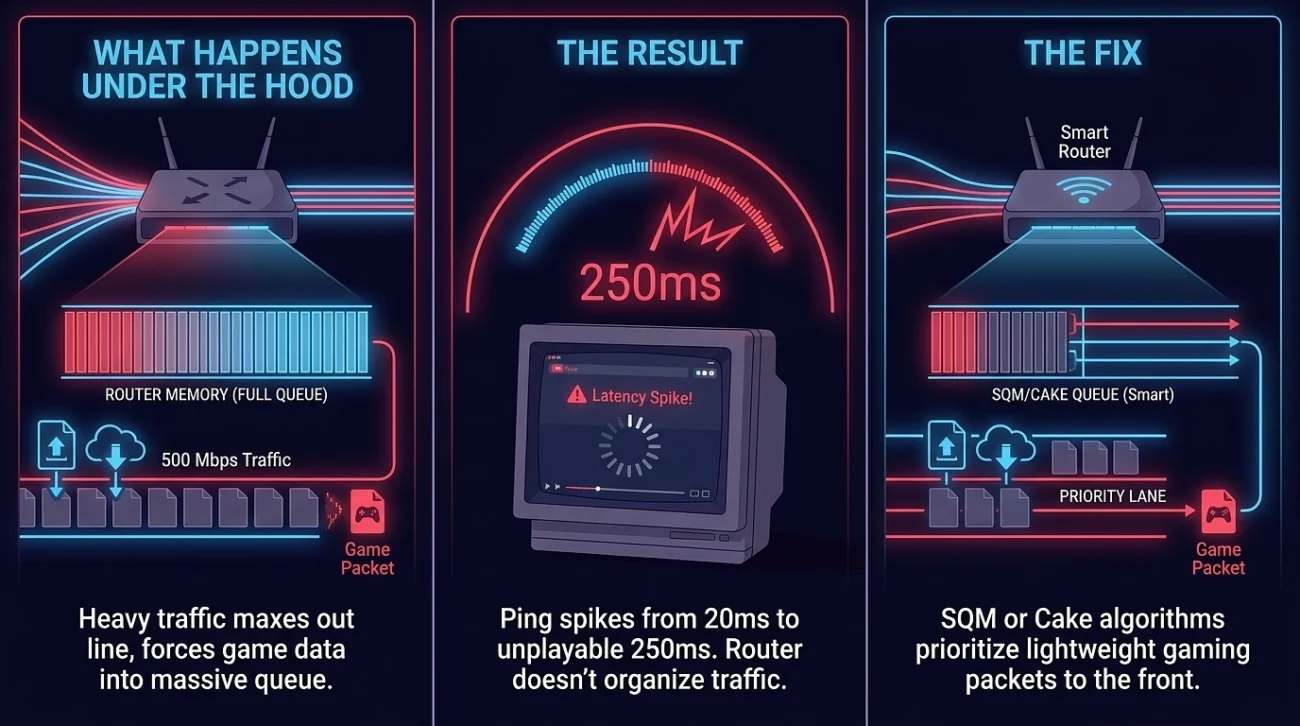
The true test of a 500 Mbps connection isn’t when you are home alone; it’s when the rest of the house wakes up.
If you are in a high-stakes match while someone else in the house starts uploading a 4K video or backing up files to iCloud, your router faces a mechanical bottleneck known as Bufferbloat.
- What happens under the hood: When your 500 Mbps line gets maxed out by heavy upload or download traffic, your router’s internal memory fills up with data packets. Instead of dropping data gracefully or prioritizing your gaming packets, it forces your game data to wait in a massive queue.
- The Result: Even though you pay for 500 Mbps, your ping can instantaneously spike from a smooth 20ms to an unplayable 250ms because your router doesn’t know how to organize the traffic.
- The Fix: Having 500 Mbps gives you a massive buffer, but to protect your gaming, you need a router utilizing SQM (Smart Queue Management) or Cake/FQ_CoDel algorithms to ensure your lightweight gaming packets skip to the front of the line.
3. Where 500 Mbps Actually Matters: The Modern Asset Problem
While 500 Mbps won’t inherently lower your ping, it completely shifts the paradigm when it comes to game deployment and patches. Modern game files are notoriously massive, often clearing 100GB to 150GB.
| Connection Speed | Estimated Time for a 100GB Update | Real-World Experience |
|---|---|---|
| 50 Mbps | ~4.5 Hours | Your gaming night is effectively canceled. |
| 150 Mbps | ~1.5 Hours | Long enough to go cook dinner and wait. |
| 500 Mbps | ~25–30 Minutes | Ready by the time you change, grab a drink, and warm up. |
Note: In reality, you rarely hit the theoretical maximum speed because your download is throttled by the delivery limits of content networks like Steam, PlayStation Network, or Xbox Live servers.