Forza Horizon 6 Keeps Dropping on Xbox Cloud Gaming: Real Causes and Fixes That Actually Hold

You load up Forza Horizon 6 on the cloud, the stream kicks in, and then it bails on you. Picture freezes mid-corner. Input lags by half a second. Or the whole thing dumps you back to the dashboard with no warning. And the annoying part is your end looks totally fine. Game’s running, the little connection bar is sitting there full, and it still drops.
Here’s the thing most people get wrong about these drops. They’re almost never the game breaking. It’s connection behaviour, session timeouts, and a couple of launch quirks that nobody tells you about. Sort those and the drops mostly stop.
Start Here: The Early Access Thing Trips Everyone Up
Before you go digging for fixes, check this. The four-day Early Access head start for Premium Edition buyers never worked on Xbox Cloud Gaming. Cloud only switched on at standard launch. So if you tried streaming it during that early window and it wouldn’t load, or dropped the second it opened, nothing was broken. Cloud just wasn’t live yet.
Past launch and still dropping? Then keep reading, the rest is for you.
Your Connection Is Usually The Problem, Just Not How You’d Guess
Cloud gaming barely cares about your download speed. A 300 Mbps line will drop Forza Horizon 6 exactly as fast as a 30 Mbps one if the connection’s shaky. What actually kills the stream is jitter and packet loss tiny irregular gaps in the data flow that a speed test will never catch. You run the test, see a big number, assume you’re fine. The number was never the issue.
A Few Things Make Those Gaps Worse:
- Wi-Fi congestion. A fast racing game over a crowded 2.4GHz band is trouble waiting to happen. Stream holds steady right up until someone microwaves lunch or a device starts backing up, then it stutters and the session goes.
- Distance from the router. xCloud wants a steady round trip, not a quick one. Two walls between you and the router and the latency creeps up until the service decides the link isn’t good enough and ends it.
- Background bandwidth. Phone updating, console pulling down another download, someone else streaming in the next room. It all fights for the same pipe and starves your game.
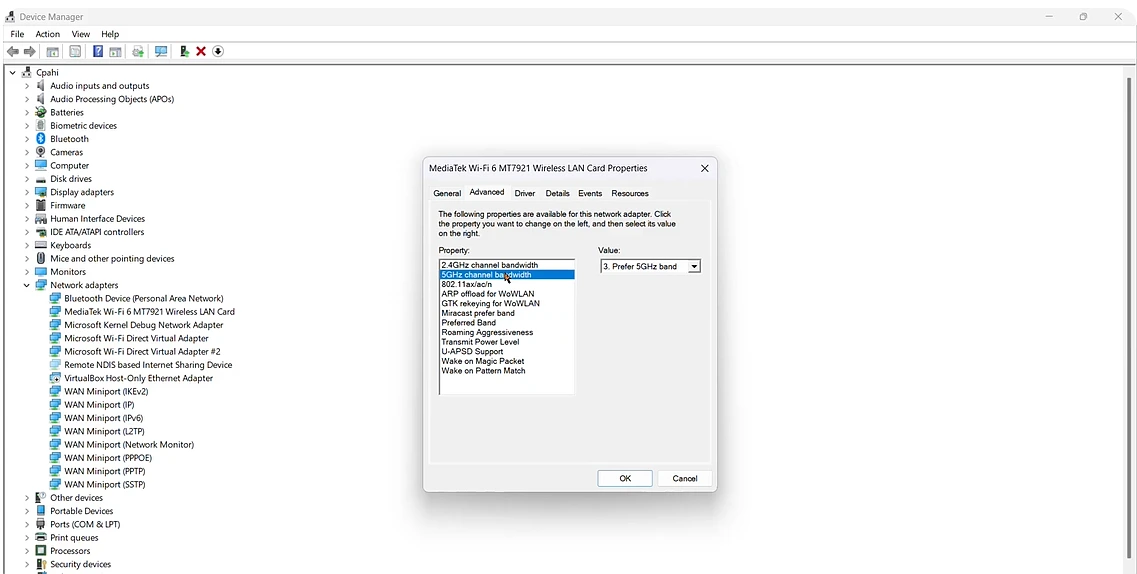
The fix isn't exciting but it works. Get on 5GHz, or better, go wired with an Ethernet adapter. Can't go wired? Move closer to the router and clear the heavy traffic off your network before you start a session. Most of those "random" drops stop being random the moment the connection's stable.
Session Timeouts And The Idle Disconnect
Xbox Cloud Gaming kills sessions that look inactive. Put the controller down to grab a call, answer a text, wander off mid-festival, and the service can pull your session to free up a server. You come back to a frozen frame or the menu.
Looks exactly like a crash. Isn’t one. If your drops keep landing right after you stepped away or sat in a menu too long, that’s the idle timeout, not a fault. There’s no toggle to switch it off either. You either keep the session active or just accept you’ll be relaunching after any proper break.
Controller Drops That Look Like Stream Drops
Sometimes the stream’s perfectly fine and it’s your controller that lost the plot. A Bluetooth pad that cuts out for a second reads on screen like the whole game froze. Forza Horizon 6 is still streaming away happily, you just can’t steer.
Bluetooth pads wander out of range and drop under interference way more than a wired one ever will. So if your “drop” comes with the game clearly still running but nothing responding, look at the controller first, not the cloud. Plug it in with a cable, or re-pair it fresh, and most of these clear right up.
Regional Unlock Timing, If Launch Day Caught You Out
Forza Horizon 6 used a rolling-midnight unlock. The game went live at 12:01am in the easternmost zone of each region rather than everywhere at once, and on cloud specifically it opened at 06:01am UTC on May 19. Anyone who jumped in before their region’s window hit saw failures that looked like sync errors but were really just early attempts at a title that hadn’t unlocked for cloud yet. Dead issue now, but it’s why launch day saw a wave of “it won’t connect” complaints.
The Reset Sequence For When Nothing’s Obvious
When you can’t pin down the cause, run these in order. It clears most of the stubborn ones:
- Close the game fully and relaunch rather than resuming. A fresh session skips past a stuck one.
- Sign out of your Xbox profile in the browser or app, then back in, to wipe a stale login state.
- Clear the browser cache if you stream in a browser, or restart the Xbox app on console or mobile.
- Restart the router, not just your device, so the whole connection path resets end to end.
- Test a different network if you can. Phone hotspot works. It tells you whether the problem follows you or stays put on one connection.
References:
- Forza Support — Forza Horizon 6 Release Timing (cloud unlock May 19, 06:01am UTC; Early Access not on Cloud Gaming)
- Xbox Cloud Gaming official support documentation — connection requirements and session behaviour