
Why Claude Reset Timer Keeps Sliding Later and Why No Human Is Coming to Un-Stick It

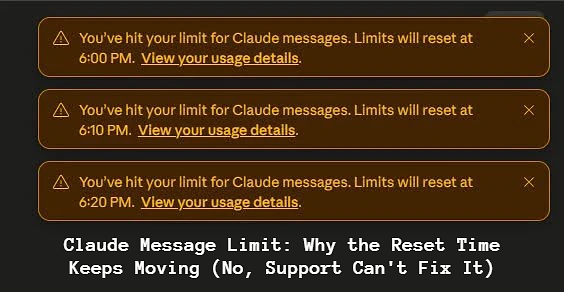
Three brown banners, stacked on top of each other. The first says your limit resets at 6:00 PM. The second says 6:10. The third says 6:20. Same account, same afternoon, and a finish line that moves every time you look at it. Somewhere in the middle of that you go hunting for a support contact and find a bot, a help center, and no phone number anywhere on earth, and by then the question has stopped being “when do I get my messages back” and become “does anyone actually work here?”
I went digging through Anthropic’s help pages and a pile of forum threads to answer both, because the sliding timer and the missing human turn out to be the same story. The system is built to run without anyone standing behind it, and once you see the machinery, the moving clock stops looking like a glitch.
Rolling, Not Scheduled
Claude limit does not reset on a fixed clock the way a phone plan flips over at midnight. It runs on a rolling five-hour window that opens the moment you send your first message and tracks what you spend across the next 300 minutes.
Which changes what “resets at 6:00” even means. That timestamp is an estimate of when enough of your earlier usage will have aged out of the window to let you back in. It is a forecast, not an appointment. So every message you fire at a capped account, every hopeful little “test,” adds fresh usage to the ledger and nudges the forecast later. 6:00 becomes 6:10 becomes 6:20 because you kept knocking. The fix is almost embarrassing: when the banner appears, stop sending. Close the tab, go make tea, and let the window drain without topping it back up.
Tokens Are The Currency, And Long Chats Are Expensive
The other misunderstanding runs deeper. People picture the limit as a message counter, forty texts and you are done. Claude counts tokens instead[1], chunks of text, and every message costs a different amount depending on its length, its attachments, the model you picked, and how big the conversation has already grown.
That last factor is the one I had to read twice. Claude re-reads the entire conversation on every turn. By message twenty you are not paying for message twenty, you are paying to reprocess the previous nineteen along with it, which is why a marathon thread with a couple of PDFs in it can drain an allowance ten times faster than a string of short, separate chats. Two people on identical plans have completely different days this way. One sent thirty tidy prompts. The other pasted half a novel into one conversation and hit the wall before lunch, then wrote an angry Reddit post about it.
Everything shares one bucket, too. Web app, desktop, Claude Code, all of it draws from the same allowance, so a heavy coding session eats the messages you were saving for the evening. (This surprises almost everyone the first time.)
Which Wall Did You Hit?
Two separate limits are running at once, and they reset on different clocks, so it helps to know which one just stopped you.
The five-hour window is the one you slam into during a single intense afternoon, and a few hours of patience cures it. Above it sits a weekly cap, a seven-day budget aimed at sustained heavy use. If you find yourself locked out on a Wednesday after several normal days in a row, that is the weekly cap talking, and waiting until dinner will not help because it renews on a much longer cycle.
The actual numbers behind both are a moving target, and I mean that literally. In May 2026, Claude Code director Boris Cherny announced the five-hour limits were being doubled across paid plans, alongside removing a peak-hours throttle that used to shrink quotas during busy mornings. A week later the official ClaudeDevs account wiped everyone’s counters with a cheerful post reading “Happy Friday! We’ve reset everyone’s 5-hour and weekly rate limits.” Companies do not do that with stable, fixed numbers. So treat any specific figure you read online, including rough 2026 estimates of a couple dozen free messages per window and about five times that on Pro, as weather, not climate.
One thing the limit is not: the context window. The 200K-token context window is how much of a single conversation Claude can hold in its head at once. It has nothing to do with your daily allowance, and no amount of context will protect you from a reset.
The Support That Exists, And The Support That Never Did

Now the part that made you type your complaint into a search bar. There is no phone number. There is no live human chat. For everyday users, the road runs through the help center at support.claude.com, several hundred articles deep, then through an AI support agent called Fin, which can hand genuinely stuck cases to a human team that answers by email. Free accounts are expected to make do with the articles and the bot. Pro and Max subscribers get the “Send us a message” option, where Fin can escalate to actual staff. Enterprise accounts get designated human contacts. Nobody, at any tier, gets a person in real time.
The route, for the record: log in, click your initials in the lower-left corner, choose “Get help.” Locked out of your account entirely? Go straight to support.claude.com, hit the message icon, and pick the can’t-log-in option, which works without a session. And check status.claude.com before any of that, because a decent share of “I hit my limit” complaints turn out to be outages hitting everyone at once.
Here is the detail that reframes the entire grievance, though, and I have not seen a single complaint thread acknowledge it. Support staff cannot reset or extend a usage quota. Not for free users, not for Pro, not for Enterprise admins with dedicated contacts. The wall is automated on purpose, so that it cannot be argued with, sweet-talked, or escalated past. The human you were searching for, the one who would reach into your account and hand your messages back, was never on the payroll. Which sounds bleak and is actually clarifying. Every minute spent hunting for that person is a minute better spent on the window itself, because the window is the only thing that opens.
Getting More Out Of A Window
Waiting works. Working smarter works better, and all of it comes down to spending fewer tokens per unit of actual progress.
How to Bypass and Avoid the Shifting Timer:
| Actionable Strategy | How It Saves Your Quota |
|---|---|
| Start Fresh Every 15 Messages | Prevents Claude from re-reading long histories and burning thousands of tokens per prompt. |
| Use the Edit Icon | Replaces your last message instead of stacking a new one, cutting context bloat by up to 90%. |
Run the /compact Command | If using developer tools, compresses chat history into a brief summary to save token space. |
| Batch Your Questions | Group 3–4 queries into a single structured prompt to minimize server round-trips. |